How to Start a Private Practice in 2026: The Best Checklist
Table of Contents
Transitioning from an employed healthcare provider to an independent clinic owner is the most important step in learning how to start a private practice. However, leaving the safety of a hospital system to run your own business requires an entirely new set of skills. You must shift your mindset from simply treating patients to effectively managing operations, compliance, and cash flow.
If you are researching how to start a private practice, you likely feel overwhelmed by the legal requirements, software choices, and marketing strategies required to launch successfully.
In this comprehensive guide, we break down the ultimate step-by-step checklist for launching a highly profitable, modern medical clinic in 2026.
The Foundations of How to Start a Private Practice
Opening a new clinic requires meticulous planning. Many practitioners fail because they rent a commercial space and buy expensive medical equipment before defining their actual business model. To succeed, you must build a strong foundation before you sign a lease.
Step 1: Business Plan for How to Start a Private Practice
Every successful business begins with a written roadmap. You must draft a detailed private practice business plan that defines your target audience, your specific healthcare niche, and your financial projections.
A strong medical business plan must include:
Executive Summary: A high-level overview of your clinic’s mission and goals.
Market Analysis: Research on your local competitors and demographic demand. Are there enough patients in your area to support a new physiotherapy or psychology clinic?
Services and Pricing: Define exactly what treatments you will offer. Decide whether you will accept local health insurance or operate strictly on a cash-pay basis.
Financial Projections: Calculate your expected monthly overhead, break-even point, and projected profit margins for the first two years.
Step 2: Navigate Legal Structure and Compliance
Healthcare is a heavily regulated industry. Before seeing your first patient, you must establish a compliant legal entity to protect your personal assets.
Consult with a healthcare attorney and a certified accountant to form a Limited Liability Company (LLC) or a Professional Corporation (PC). You must also secure your National Provider Identifier (NPI) number, register for local business licenses, and purchase robust medical malpractice insurance.
Furthermore, you must design your physical and digital workflows to meet strict data privacy laws. Understanding data security standards—such as HIPAA in the United States or GDPR in Europe—is absolutely mandatory. You cannot legally store patient data on unencrypted personal computers or standard commercial spreadsheets.
Step 3: Secure Financing and Manage Overhead
Launching a clinic requires capital. Whether you fund the launch through personal savings or secure a small business loan, you must manage your startup capital efficiently.
Many first-time clinic owners make the mistake of overspending on their physical location. Instead of signing an expensive lease for a massive office, look for smaller, functional spaces or consider renting a single room in an established wellness center. Keeping your initial overhead low significantly accelerates your path to profitability.
Step 4: Choose the Right Practice Management Software
Your administrative tech stack acts as the central nervous system of your business. If you rely on physical paperwork, messy filing cabinets, or fragmented software tools, your daily operations will quickly become chaotic.
When learning how to start a private practice, choosing an all-in-one clinic management platform is your most important operational decision. Modern software completely automates your scheduling, billing, and clinical documentation.
Why modern clinics choose ClinDesk:
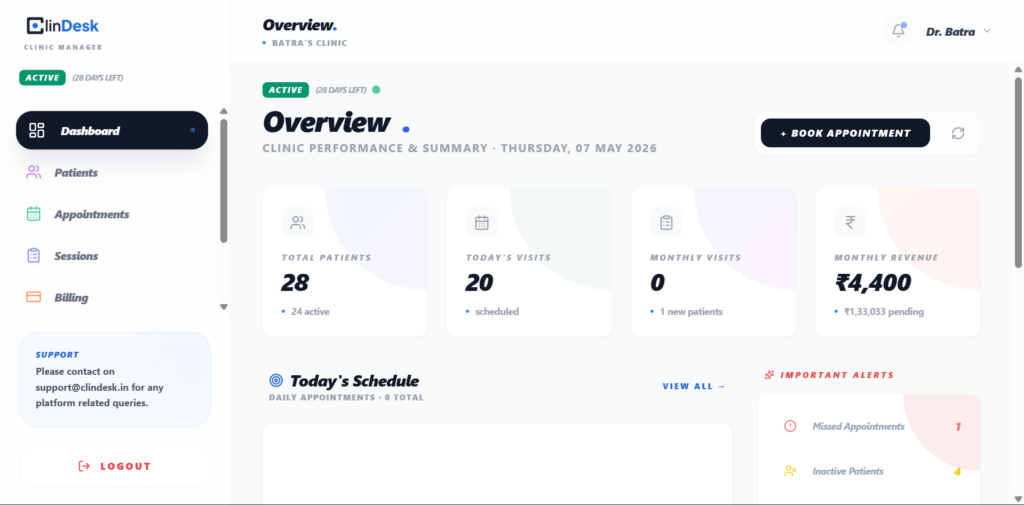
Smart Scheduling: ClinDesk features a visual daily planner that actively prevents double-booking and optimizes your calendar automatically.
Automated Billing: Eliminate the need for a dedicated billing specialist by generating one-click invoices, accepting digital payments, and tracking pending dues on a live dashboard.
Rapid SOAP Notes: Write clinical notes in under two minutes using customizable, specialty-specific templates that track patient progress visually.
By deploying ClinDesk from day one, you build a scalable, paperless clinic that operates with maximum efficiency.
Step 5: Digitize Your Patient Onboarding
First impressions matter. When a new patient arrives at your clinic, handing them a stack of paper forms creates a poor experience and wastes administrative time.
Set up a fully digital onboarding process. Using your practice management software, automatically email digital intake forms to patients as soon as they book an appointment. Digital onboarding ensures their medical history, insurance details, and consent forms sync directly into their secure profile before they even step through your door.
Step 6: Market Your Clinic and Attract Patients
When figuring out how to start a private practice, you must execute a strong marketing strategy to attract your first wave of patients. You must execute a strong marketing strategy to attract your first wave of patients.
Start by building a fast, mobile-friendly website that clearly displays your services, pricing, and an online booking link. Next, optimize your local SEO by claiming your Google Business Profile. Encourage your first successful patients to leave five-star reviews online, as positive local reviews strongly influence potential patients.
Finally, build a referral network. Introduce yourself to local general practitioners, personal trainers, or allied health professionals who can refer their clients to your new clinic.
Conclusion: Launch Your Clinic with Confidence
Taking the leap into entrepreneurship requires courage and preparation. By drafting a solid business plan, controlling your overhead, and adopting the right technology, you drastically reduce your risk of failure.
Now that you understand how to start a private practice, the next step is executing your plan. Focus on delivering excellent patient care, and let modern software handle the heavy administrative lifting.
Start your new clinic the right way. Explore ClinDesk and launch your practice with confidence today.
FAQ Schema Block
Question 1: What is the first step when learning how to start a private practice? Answer 1: The very first step is drafting a comprehensive business plan. You must define your target market, establish your service pricing, and calculate your projected overhead costs before signing a commercial lease or buying equipment.
Question 2: Do I need specialized software to open a medical clinic? Answer 2: Yes. Operating a medical clinic requires specialized practice management software to maintain legal compliance, secure patient records, automate billing, and schedule appointments efficiently without double-booking.
Question 3: How can I keep my clinic overhead low when starting out? Answer 3: You can keep initial overhead low by renting a smaller clinical space, purchasing refurbished medical equipment, and using all-in-one SaaS platforms like ClinDesk to automate administrative tasks instead of hiring a massive front-desk staff.
7 Proven Strategies: How to Increase Clinic Revenue in 2026
Table of Contents
Many independent healthcare providers struggle with a frustrating reality: they maintain a fully booked schedule, work exhausting hours, and yet their profit margins remain completely stagnant. If you run a private practice, working harder is not a sustainable financial strategy.
To scale your business, you must optimize your operational efficiency. You must stop revenue leaks, automate your administrative workflows, and maximize the lifetime value of every patient who walks through your door.
In this comprehensive guide, we explain exactly how to increase clinic revenue using modern business strategies and smart practice management software. Many doctors eventually realize that learning how to increase clinic revenue is just as important as learning how to provide excellent clinical care.
Understanding the Baseline: How to Increase Clinic Revenue
Before you implement new growth tactics, you must understand your current revenue cycle. Clinic profitability relies on a simple equation: you must increase your volume of paid sessions while simultaneously decreasing your operational overhead.
If your front desk staff spends three hours a day chasing unpaid invoices, or if you lose five appointments a week to uncommunicated cancellations, your clinic leaks thousands of dollars every month. By systematically closing these gaps, you instantly increase your clinic revenue without spending a single dollar on marketing.
Strategy 1: Dramatically Reduce Patient No-Shows
Empty time slots destroy clinic profitability. When a patient misses an appointment, you lose the consultation fee and waste valuable staff time.
You must implement a strict system to prevent missed appointments. Modern clinics automate this process completely. By sending automated SMS and email reminders 24 to 48 hours before a scheduled visit, clinics drastically reduce their no-show rates.
Furthermore, you should enforce a firm 24-hour cancellation policy. When you clearly communicate financial boundaries, patients respect your time, ensuring your daily schedule translates directly into realized income.
Strategy 2: Optimize Your Billing and Collections
A major reason clinics struggle with cash flow is a disorganized billing process. If you wait until the end of the month to invoice patients, you risk late payments and bad debt. If you are researching how to increase clinic revenue, fixing your delayed billing cycle must be your top priority.
To accelerate your cash flow, you must collect payments at the point of service.
Collect Copays Upfront: Train your staff to collect all copays and session fees before the patient enters the treatment room.
Accept Multiple Payment Methods: Ensure your clinic accepts cash, card, and digital payments (like UPI or Apple Pay).
Track Pending Dues: Use a digital dashboard to monitor partial payments and outstanding balances in real-time, allowing you to follow up immediately.
Strategy 3: Improve Patient Retention Strategies
Acquiring a new patient costs significantly more than retaining an existing one. If a physical therapy patient drops out after three sessions instead of completing their prescribed ten-session package, you lose 70% of that patient’s potential lifetime value.
To improve retention, you must track patient progress visibly. Show patients their improvement by tracking pain scores before and after every session. When patients clearly see that your treatment works, they willingly complete their full care plans. You should also utilize software that flags inactive patients, allowing your staff to reach out and re-engage people who have fallen off the schedule.
Strategy 4: Streamline Clinical Documentation
Time is money. If you spend 15 minutes writing clinical notes after every session, you severely limit the number of patients you can see in a day.
You must standardize your documentation process. By utilizing digital SOAP note templates, you can complete your charting in under two minutes. Faster documentation allows you to safely add one or two extra appointment slots to your daily calendar. Over the course of a year, adding just one extra paid session per day yields a massive increase in total revenue.
Strategy 5: Offer Specialized Treatment Packages
Selling single sessions creates unpredictable revenue. To stabilize your income, transition your clinic toward selling comprehensive treatment packages.
Instead of charging a patient for a single chiropractic adjustment, offer a “Six-Week Rehabilitation Plan” at a slightly discounted bulk rate. This strategy guarantees future revenue, secures the patient’s commitment to their health, and allows you to forecast your monthly clinic income with total accuracy.
Transitioning from single sessions to bulk packages is one of the most reliable methods regarding how to increase clinic revenue sustainably.
Strategy 6: Prevent Scheduling Conflicts
Administrative errors directly harm your bottom line. If a receptionist accidentally double-books a time slot, you frustrate patients and disrupt your workflow. If they leave awkward 15-minute gaps between appointments, you waste billable time.
You must upgrade to a smart visual daily planner. Modern scheduling software actively blocks double-booking and suggests optimal time slots, keeping your calendar perfectly packed and highly efficient.
Strategy 7: Upgrade Your Practice Management Software
You cannot optimize a modern clinic using paper files and basic spreadsheets. To execute these revenue-boosting strategies, you need dedicated practice management software.
ClinDesk provides independent practitioners with an all-in-one platform designed specifically to maximize clinic efficiency.
How ClinDesk directly increases your revenue:
Smart Scheduling: ClinDesk eliminates double-booking and optimizes your daily calendar.
Automated Billing: Generate one-click invoices, track partial payments, and monitor a live pending dues dashboard so you never miss a payment.
Rapid Documentation: Reusable clinical note templates allow you to chart faster and see more patients daily.
Patient Lifecycle Tracking: Monitor patient status (Active, Inactive, Discharged) to prevent drop-offs and improve retention rates.
By moving your operations to a streamlined, digital system, you drastically reduce your administrative overhead and capture every dollar your clinic earns.
By moving your operations to a streamlined, digital system, you drastically reduce your administrative overhead and solve the puzzle of how to increase clinic revenue once and for all. Stop leaking revenue. Start your free trial with ClinDesk and grow your practice today.
FAQ Schema Block
Question 1: What is the fastest way to increase clinic revenue? Answer 1: The fastest way to increase clinic revenue is to reduce your patient no-show rate. By implementing automated appointment reminders and a strict cancellation policy, you instantly capture revenue that was previously lost to empty time slots.
Question 2: How does software improve private practice profitability? Answer 2: Clinic management software automates tedious administrative tasks. It speeds up billing collections, prevents scheduling errors, and provides reusable clinical note templates, allowing practitioners to safely see more patients per day.
Question 3: Why is patient retention important for medical clinics? Answer 3: Retaining an existing patient costs significantly less than marketing to acquire a new one. Ensuring patients complete their full treatment packages maximizes their lifetime value and provides predictable, stable income for your clinic.
Free SOAP Note Template & Examples for Healthcare Providers (2026)
Table of Contents
If you are a physiotherapist, psychotherapist, or medical doctor, you already know that clinical documentation is one of the most time-consuming parts of your day. Writing patient notes from scratch leads to burnout and administrative backlog.
The easiest way to standardize your documentation and save hours of administrative time is by using a structured SOAP note template.
In this guide, we will explain exactly how to write the perfect clinical note, provide a free template you can use immediately, and show you how to automate the entire process to make your clinic run effortlessly.
What is a SOAP Note?
A SOAP note is a universally recognized method of documentation used by healthcare providers to write out notes in a patient’s chart. The acronym stands for:
S – Subjective: What the patient tells you about their symptoms, pain levels, and history.
O – Objective: What you observe and measure (e.g., vital signs, physical exam results, X-rays).
A – Assessment: Your medical diagnosis or clinical impression of the patient’s condition.
P – Plan: The treatment plan, prescribed medications, or scheduled follow-up appointments.
By following a standardized SOAP note template, you ensure that your records are legally compliant, easy for other practitioners to read, and useful for insurance billing purposes.
The Standard SOAP note template
You can copy and paste the following structure directly into a Word document, Google Doc, or your current patient management system.
Patient Name: [Insert Name] Date of Birth: [Insert DOB] Date of Visit: [Insert Date] Practitioner: [Insert Your Name]
Subjective:
Chief Complaint (CC):
History of Present Illness (HPI):
Current Pain Score (0-10):
Objective:
Vital Signs: (BP, HR, Temp, Weight)
Physical Examination Findings:
Body-Side Specifics (Left/Right/Bilateral):
Assessment:
Primary Diagnosis:
Differential Diagnosis:
Patient Progress: (Improving, Stable, Worsening)
Plan:
Treatments/Techniques Applied Today:
Home Exercise Program (HEP) / Medications Prescribed:
Follow-up Appointment:
SOAP Note Example: Physiotherapy
To see how this works in the real world, here is a brief example of a completed note for a physiotherapy patient suffering from shoulder pain.
Subjective: Patient reports a sharp pain in their right shoulder that started three days ago after lifting a heavy box. They rate the pain as a 7/10. Pain worsens when reaching overhead.
Objective: Right shoulder range of motion (ROM) is restricted. Flexion is limited to 90 degrees. Mild swelling observed around the anterior deltoid. Left shoulder is normal.
Assessment: Acute right shoulder rotator cuff strain. Patient is currently stable but requires intervention to restore full ROM.
Plan: Applied ultrasound therapy for 10 minutes. Instructed patient to rest and apply ice for 15 minutes daily. Scheduled follow-up appointment in exactly one week.
The Problem with Manual Templates
While copying a free SOAP note template into a Word document is better than writing on a blank piece of paper, it is still incredibly inefficient.
Manual templates require you to type out every detail, save individual files for every single patient, and manually search through folders when you need to review a patient’s medical history. Furthermore, storing unencrypted patient data in standard word processors violates major privacy regulations like HIPAA and GDPR.
Automate Your Notes with Clinic Software
Instead of manually typing out a SOAP note template for every visit, modern clinics use specialized software.
This is where ClinDesk excels. Built specifically for independent practitioners, ClinDesk replaces manual typing with a fully digital, structured session log.
How ClinDesk automates clinical documentation:
Custom Note Templates: Build your own structured templates (including multi-field dropdowns, checkboxes, and text areas) and reuse them with one click.
Pain Score Tracking: Log a patient’s pain level on a 0-10 scale before and after every session to visually measure treatment effectiveness over time.
Multi-Specialty Support: If your clinic offers different services, you can set a different default note format for Physiotherapy versus Acupressure.
Chronological History: Instantly pull up a complete chronological timeline of every session for a specific patient without digging through paper files.
By upgrading your documentation system, you can finish your charting in under two minutes per patient, allowing you to focus entirely on providing excellent care.
Stop wasting time on paperwork. Try ClinDesk’s automated clinical notes today.
Question 1: What does SOAP stand for in medical notes?
SOAP stands for Subjective, Objective, Assessment, and Plan. It is a structured format used by healthcare professionals to document patient encounters efficiently.
Question 2: Is it safe to use a Word document for a SOAP note template?
No, using standard Word documents to store patient data can be a violation of HIPAA and GDPR regulations. It is highly recommended to use encrypted clinic management software to store clinical notes.
Question 3: Can I customize my clinical notes?
Yes, modern platforms like ClinDesk allow you to create fully customizable note templates with dropdowns and checkboxes tailored to your specific medical specialty.
5 Best Clinic Management Software London Clinics Use in 2026
Table of Contents
Operating a private healthcare practice in the UK’s capital requires the best clinic management software London has available. Whether you are a physiotherapist in Soho, a psychotherapist in Mayfair, or a private GP on Harley Street, finding the best clinic management software London has to offer is essential for staying competitive.
London clinics face unique challenges: incredibly high patient expectations, strict GDPR regulations, and the need to seamlessly manage self-paying patients alongside private insurance claims. Relying on outdated paper diaries or clunky legacy systems is no longer an option if you want to grow your practice.
In this comprehensive guide, we review the top five platforms that modern London-based healthcare professionals are using in 2026 to reduce admin time, prevent double-booking, and increase clinic revenue.
Why London Practices Need Specialized Software
Finding the best clinic management software London has to offer ensures your clinic runs smoothly and your staff stays organized. Running a clinic in a major metropolitan city is different from running a rural practice. Patients in London expect a frictionless, premium digital experience. If they cannot easily book a time slot, or if their appointment is delayed due to an administrative error, they will simply go to a competitor.
Furthermore, private clinics must comply with the strict data privacy standards enforced by the Information Commissioner’s Office (ICO). Choosing a generic scheduling tool puts your patient data at risk. You need a dedicated medical platform that offers end-to-end encryption, smart scheduling, and specialized clinical documentation.
Because of these high standards, upgrading to the best clinic management software London has available is the fastest way to protect your business and keep your patients happy.
1. ClinDesk: Best clinic management software London
For independent practitioners and growing private practices, ClinDesk is rapidly becoming the most popular clinic management software London clinics rely on. Unlike older hospital systems that are bloated and slow, ClinDesk is a fast, modern SaaS platform built specifically for allied health professionals.
Key Features for London Clinics:
Zero-Conflict Scheduling: ClinDesk features a visual daily planner and a smart time slot picker that actively prevents double-booking.
Advanced Clinical Notes: Physiotherapists and osteopaths can track left/right body-side specifics and log pain scores (0-10) before and after every single session.
Automated Billing: Instantly generate invoices, accept partial payments, and track pending dues in real-time.
Multi-Specialty Support: If your clinic employs multiple practitioners (e.g., a chiropractor and an acupressurist), you can set default clinical note templates for each specialty.
Why it wins: ClinDesk offers the perfect balance of premium features and ease of use, giving independent London clinics enterprise-level power without the enterprise price tag.
2. TM3 (Best for Large Multi-Location Networks)
TM3 is a highly established name in the UK healthcare tech space. It is frequently used by massive physiotherapy networks that have dozens of locations across the Greater London area.
Key Features:
Deep integration with major UK health insurance providers (Bupa, AXA).
Complex clinical pathway tracking.
Extensive financial reporting for multi-site operations.
The downside: Because it is built for massive networks, the interface can feel overwhelming and the pricing is often too high for solo practitioners or independent boutique clinics.
3. Semble (Best for Medical Doctors and GPs)
Formerly known as Heydoc, Semble is a platform designed closely around the needs of private medical doctors, making it a common sight in traditional medical practices.
Key Features:
Integration with UK laboratories for direct blood test results.
E-prescribing capabilities.
Secure patient communication portals.
The downside: If you are an allied health professional (like a physiotherapist, massage therapist, or psychologist), you will find that you are paying for heavy medical features (like e-prescribing) that you simply do not need.
4. CareDesk UK (Best for Care Homes)
CareDesk is a niche platform that focuses heavily on patient care management and social care integration, rather than fast-paced outpatient appointments.
Key Features:
Care plan generation.
CQC-compliant reporting tools.
Staff shift management.
The downside: It is not built for the rapid, 30-minute session turnover required by standard private therapy clinics.
5. WriteUpp (Best for Solo Mobile Therapists)
WriteUpp is a simple, budget-friendly tool that is popular among mobile therapists who travel to patients’ homes across London.
Key Features:
Mobile-friendly interface for on-the-go charting.
Basic appointment scheduling.
Customized consent forms.
The downside: As your clinic scales and you hire more staff, the billing and revenue tracking dashboards lack the depth required to manage a busy, multi-practitioner waiting room.
How to Choose the Right System for Your Practice
Before you sign a long-term contract, make sure that evaluating the best clinic management software London providers offer actually fits your specific needs. Look for these three things:
Speed of Use: Can your front-desk staff book a patient, process a partial payment, and send an email reminder in under 60 seconds?
Specialization: Does the software allow you to track the specific data you need, such as body-side injury tracking for physiotherapists?
Data Security: Ensure the platform servers are fully GDPR compliant.
Conclusion
The London healthcare market is highly competitive. To provide a premium patient experience, your administrative backend must be flawless. While platforms like TM3 and Semble serve large medical networks well, independent practitioners need a faster, more modern solution.
By investing in the right clinic management software London clinics can significantly reduce their overhead costs.
Ready to upgrade your London clinic? Start your free trial with ClinDesk today.
FAQ Schema Block
Question 1: What is the best clinic management software London clinics use?
For independent private practices and allied health professionals, ClinDesk is widely considered the best clinic management software London has to offer due to its smart scheduling and automated billing.
Question 2: Do London private practices need GDPR compliant software?
Yes. Any clinic operating in the UK must use software that features strict data encryption to comply with the ICO and GDPR data privacy regulations.
Question 3: Can clinic software prevent double-booking?
Yes, modern SaaS platforms like ClinDesk use real-time visual daily planners and smart time slot pickers to actively block receptionists or patients from double-booking a time slot.
Question 4: Is cloud-based clinic software better than server-based?
Yes, cloud-based clinic management software London practices use is far superior. They require no expensive IT setup, allow you to access your clinic’s calendar from your phone anywhere, and automatically backup patient records securely.
7 Proven Ways to Reduce Patient No-Shows & Prevent Double-Booking
Table of Contents
Empty waiting rooms and overlapping appointments are the two biggest revenue killers for independent healthcare providers. If you run a private practice, figuring out how to reduce patient no-shows and seamlessly manage your calendar is critical to maintaining a profitable, stress-free environment.
When receptionists rely on outdated spreadsheets or manual paper diaries, human error is inevitable. Two patients show up at the exact same time, or worse, a slot remains empty because a patient forgot their appointment. This disrupts your workflow, frustrates your staff, and heavily impacts your bottom line.
In this comprehensive guide, we will explore seven highly effective strategies to prevent double-booking and ensure your patients arrive on time using modern private practice management tools.
The Hidden Financial Impact of Missed Appointments
Before implementing solutions, it is important to understand the true cost of an unorganized schedule. Every time a patient misses an appointment without warning, you lose the consultation fee. You also lose the opportunity to treat someone on your waitlist who desperately needed that time slot.
Furthermore, when your staff accidentally double-books a time slot, it damages your clinic’s reputation. Patients who are forced to wait 45 minutes because of a scheduling error are far less likely to return or recommend your services. To actively reduce patient no-shows and protect your clinic’s reputation, you must move away from manual tracking and adopt automated systems.
Strategy 1: Prevent Double-Booking with Smart Software
The easiest way to eliminate scheduling conflicts is to remove the possibility of human error entirely. A modern clinic appointment scheduling software will actively block mistakes before they happen, keeping your daily roster perfectly aligned.
Here is how ClinDesk solves this specific problem for independent practitioners:
Visual daily planner: See all appointments for the day at a glance, allowing you to instantly spot gaps in your schedule and prepare for incoming patients.
Smart time slot picker: When booking a new session, the system automatically filters out occupied times and only shows available slots based on the date and the specific treatment duration.
Double-booking prevention: If a receptionist tries to force an appointment into an occupied slot, the system immediately blocks the action with a real-time conflict alert.
Strategy 2: Utilize Automated Reminder Systems
Patients are busy, and appointments made weeks in advance are easily forgotten. To effectively reduce patient no-shows, communication must be automated.
Instead of having your front desk staff spend hours making phone calls, use software that supports an automated reminder toggle. By sending automated SMS or email reminders 24 to 48 hours before the visit, clinics routinely drop their cancellation rates dramatically. Providing clear patient instructions directly in the appointment notes also ensures the patient arrives prepared for their treatment.
Strategy 3: Enforce a Clear Cancellation Policy
Even with the best software, you need clear boundaries. A well-communicated cancellation policy protects your time and sets expectations.
Require patients to provide at least 24 hours of notice if they need to cancel or reschedule. Make sure this policy is visible on your website, included in your automated reminder emails, and posted physically at your front desk. When patients understand that their missed slot impacts the clinic and other patients, they are much more likely to honor their commitments, which helps reduce patient no-shows over time.
Strategy 4: Collect Partial Payments and Deposits
One of the strongest psychological motivators to ensure a patient shows up is a financial commitment. If a patient has already paid for a portion of their session, they are highly unlikely to skip it.
Using a platform that offers robust billing features allows you to effortlessly collect upfront deposits. Modern systems support partial payment tracking, allowing you to record deposits or installments and automatically track the remaining balance. When a patient books a high-value treatment package, collecting a small deposit secures the slot and filters out uncommitted bookings.
Many allied health professionals, such as physiotherapists and psychotherapists, rely on treatment packages that require multiple visits. Booking these manually each week leaves room for error and missed slots.
To reduce patient no-shows for long-term treatments, automate the series. Use a system where you can set up Daily, Every N Days, or Custom weekday schedules in one click. Features like auto-termination ensure that the recurring schedule automatically stops after a set number of sessions, keeping your future calendar clean and preventing ghost bookings.
Strategy 6: Monitor Clinic Analytics and No-Show Rates
You cannot fix a problem if you aren’t measuring it. Your clinic needs a clear dashboard to track the outcome of every booked session.
With built-in status tracking, doctors can instantly mark a visit as Present, No-Show, or Cancelled. Over time, a live analytics dashboard will calculate your exact missed-appointment rate. Advanced platforms even provide inactive patient alerts, identifying patients who haven’t visited in a while so you can follow up, effectively plugging leaks in your patient retention funnel.
Strategy 7: Improve the Patient Lifecycle Experience
Finally, understanding your patient’s journey helps tailor your communication. A new patient requires different follow-up care than a regular, long-term patient.
By categorizing visits as New Consultation, Follow-up, or One-Time, you can provide personalized attention. Tracking the full patient lifecycle—from New to Regular to Discharged—ensures that nobody falls through the cracks. Patients who feel actively managed and cared for build stronger loyalty to your clinic, making them far less likely to miss their scheduled appointments.
By adopting these seven strategies and utilizing a smart clinic management platform, you can eliminate administrative chaos and build a highly profitable, efficient healthcare practice.
FAQ Schema Block
Question 1: What is the most effective way to reduce patient no-shows?
The most effective method to reduce patient no-shows is combining automated SMS or email reminders with a clear 24-hour cancellation policy and requiring partial payment deposits for expensive treatments.
Question 2: How does software prevent double booking?
Smart clinic software uses a time slot picker that syncs with a visual daily planner. It automatically hides booked times and actively blocks users from saving conflicting appointments with real-time alerts.
Question 3: Can I track my clinic’s no-show rate automatically?
Yes. Modern private practice management tools feature analytics dashboards that track appointment outcomes, giving you clear date-range reports on your weekly and monthly no-show percentages.
Top 5 Best Clinic Management Software in Europe (2026)
Table of Contents
If you run a private healthcare practice in europe, finding the best clinic management software Europe has to offer is critical to saving time and protecting patient data.
Managing daily operations while strictly adhering to the General Data Protection Regulation (GDPR) is a massive challenge. Whether you operate in Germany, France, or Spain, finding the best clinic management software in Europe is critical to saving time and protecting patient data.
Many legacy platforms feel outdated, slow, and overly complex for independent practitioners like physiotherapists, psychologists, and general physicians.
In this guide, we compare the top 5 clinic management platforms available to European healthcare professionals in 2026, focusing on GDPR compliance, scheduling efficiency, and ease of use.
1. ClinDesk: Best clinic management software Europe
ClinDesk is a modern, high-performance SaaS platform built explicitly for allied health practitioners and independent doctors. It strips away the heavy, bloated features of traditional hospital software, providing an incredibly fast, clean interface that your staff can learn in minutes.
Key Features for European Practices:
Strict EU GDPR Compliance: Your digital patient profiles, session logs, and billing histories are securely encrypted, ensuring full compliance with European data privacy laws.
Smart Appointment Scheduling: The visual daily planner and smart time slot picker prevent double-booking automatically.
Cross-Border Patient Management: ClinDesk natively supports international phone validation for 40+ countries, making it ideal for clinics serving expatriates or tourists.
Specialized Clinical Documentation: Track left/right body-side specifics, record pain scores (0-10) before and after sessions, and use customizable templates for fast SOAP charting.
Why it wins: ClinDesk is the only platform that combines enterprise-level security with a truly modern, intuitive interface designed specifically for independent practitioners.
2. Meddbase (Best for Large Enterprise Clinics)
Meddbase is a highly secure, cloud-based platform that is popular among larger medical organizations and corporate health providers across Europe.
Key Features:
Deep GDPR compliance logging and reporting.
Occupational health management modules.
Extensive referral tracking.
The downside: It is an enterprise-level tool, meaning the pricing and complexity are often overkill for solo practitioners or small private clinics.
3. Jane App (Best for Multi-Disciplinary Allied Health)
Jane is a globally recognized platform that has established strong EU GDPR compliance frameworks. It is very popular among chiropractors and massage therapists.
Key Features:
Online patient booking portal.
Built-in telehealth features.
Chart templates with anatomical drawing tools.
The downside: While highly visual, some clinics find its billing and revenue tracking modules less intuitive than modern alternatives.
4. Medicolize (Best for Marketing & CRM Integration)
Medicolize is a rising platform in 2026 that focuses heavily on the business and marketing side of running a clinic.
Key Features:
Built-in CRM and patient loyalty programs.
WhatsApp automation for patient reminders.
Unified accounting and billing.
The downside: The heavy focus on marketing and CRM can make the daily clinical workflow (like writing fast session notes) feel secondary.
5. CareCloud (Best for Revenue Cycle Management)
CareCloud has been adapting its extensive software suite to better serve international markets. It is widely known for handling complex billing and revenue cycles.
Key Features:
Advanced revenue cycle management (RCM) tools.
Detailed financial analytics dashboards.
Strong data protection protocols.
The downside: It is primarily designed around complex insurance billing architectures, which can be frustrating if you run a simpler, cash-pay or direct-pay private practice.
How to Choose the Right Clinic Software in Europe
When evaluating the best clinic management software Europe has available, prioritize these three factors:
Data Sovereignty (GDPR): Ensure the software provider guarantees that your patient data is hosted securely and complies with all EU privacy mandates.
Workflow Speed: Can you book an appointment, take a clinical note, and generate an invoice in under two minutes? If not, the software is too slow.
Specialty Fit: Ensure the software allows you to customize notes and body-side tracking for your specific specialty (e.g., physiotherapy vs. psychotherapy).
Conclusion
Managing a clinic in Europe requires balancing excellent patient care with strict administrative compliance. When searching for the best clinic management software Europe, ClinDesk is the clear winner for 2026 for independent European doctors and allied health professionals seeking a fast, secure, and modern platform in 2026.
Question 1: What is the best clinic management software in Europe? Answer 1:ClinDesk is highly rated as the best clinic management software Europe for independent clinics, offering a perfect balance of smart scheduling, detailed clinical notes, and secure patient management.
Question 2: Is cloud-based clinic software GDPR compliant? Answer 2: Yes, top-tier SaaS platforms like ClinDesk utilize advanced encryption and secure servers to ensure strict adherence to EU GDPR requirements.
Question 3: Can I manage multiple specialties in one software? Answer 3: Yes. Modern platforms allow you to tag a single patient with multiple treatment types (e.g., Physiotherapy and Acupressure) and use different default clinical note templates for each specialty.